
Resource Manager – 99 of 100 Days of Code
The Resource Manager lets you configure a variety of visuals for your projects.
Icons, images, you have a lot of tools for creating new elements to add into your app’s user interface.
For more on this, watch the video below.
While reviewing how to add images to apps, I played around with the Resource Manager. The first thing I did was import an image, called a drawable, into my project. During the import, I found a setting for something called Qualifiers.
 Device Configuration Qualifiers are used to configure how the drawable will change for various devices. It can customize drawables for different screen orientations, device languages, screen sizes, etc.
After importing my image, I changed over to the Color tab. To my surprise, Android Studio also added a series of custom colors found in the new drawable!
Device Configuration Qualifiers are used to configure how the drawable will change for various devices. It can customize drawables for different screen orientations, device languages, screen sizes, etc.
After importing my image, I changed over to the Color tab. To my surprise, Android Studio also added a series of custom colors found in the new drawable!
 It automatically pulled each hex value for every color in the image. This would save plenty of time if I wanted to use these colors for my app’s theme, the icon, or any other visual elements.
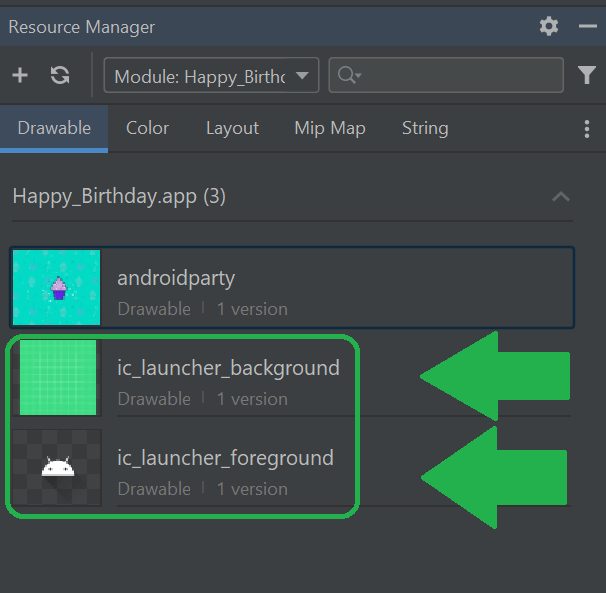
During this process I also noticed the default foreground/background images used for app icons. Whenever I create an app, they always have the same android logo on a green background. Now I know which files to edit or replace when I’m ready to build custom icons for my apps.
It automatically pulled each hex value for every color in the image. This would save plenty of time if I wanted to use these colors for my app’s theme, the icon, or any other visual elements.
During this process I also noticed the default foreground/background images used for app icons. Whenever I create an app, they always have the same android logo on a green background. Now I know which files to edit or replace when I’m ready to build custom icons for my apps.
 I’ll continue through the Android Developers Basics course and review more about adding images to apps.
For more on this, watch the video below.
I’ll continue through the Android Developers Basics course and review more about adding images to apps.
For more on this, watch the video below.
 Device Configuration Qualifiers are used to configure how the drawable will change for various devices. It can customize drawables for different screen orientations, device languages, screen sizes, etc.
After importing my image, I changed over to the Color tab. To my surprise, Android Studio also added a series of custom colors found in the new drawable!
Device Configuration Qualifiers are used to configure how the drawable will change for various devices. It can customize drawables for different screen orientations, device languages, screen sizes, etc.
After importing my image, I changed over to the Color tab. To my surprise, Android Studio also added a series of custom colors found in the new drawable!
 It automatically pulled each hex value for every color in the image. This would save plenty of time if I wanted to use these colors for my app’s theme, the icon, or any other visual elements.
During this process I also noticed the default foreground/background images used for app icons. Whenever I create an app, they always have the same android logo on a green background. Now I know which files to edit or replace when I’m ready to build custom icons for my apps.
It automatically pulled each hex value for every color in the image. This would save plenty of time if I wanted to use these colors for my app’s theme, the icon, or any other visual elements.
During this process I also noticed the default foreground/background images used for app icons. Whenever I create an app, they always have the same android logo on a green background. Now I know which files to edit or replace when I’m ready to build custom icons for my apps.
 I’ll continue through the Android Developers Basics course and review more about adding images to apps.
For more on this, watch the video below.
I’ll continue through the Android Developers Basics course and review more about adding images to apps.
For more on this, watch the video below.
Sources:
Basic Android Courses

Richard is currently a developer using Java and Android Studio to build custom applications for Android. Richard tutored in mathematics at Montgomery College, and worked in Information Technology before entering the Software Development industry as a Quality Engineer.


